LED Toggle
Summary
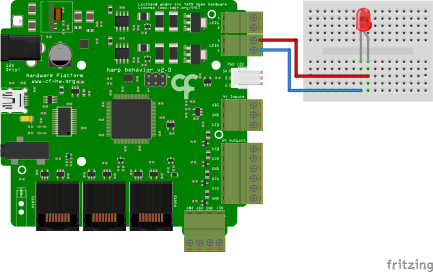
This example demonstrates how to control the brightness of a LED using the current driven ports in the Harp Behavior board (see hardware schematics below).
Workflow
Details
- Establishes the commands to be sent to the Behavior board and publishes all the events from the device. The PortName property in the Behavior node needs to be set to the COM device on the computer. To create the subject node, right-click on the Behavior node -> Create Source -> Behavior Subject, and name it accordingly.
- Sets the maximum current to be sent to the LED as a precaution.
- Sets the actual current to be sent to the LED.
- Turns the LED ON when 'A' is pressed.
- Turns the LED OFF when 'S' is pressed.
- Ensures that command messages are sent only when the device is ready.
Requirements
This example requires the following Bonsai packages:
- Harp - Behavior (from nuget.org)
Schematics
The Harp Behavior board has two current sources: Led0 and Led1. In this example, the board controls controls the brightness of an LED connected to Led0.