External TTL
TTL Inputs
The olfactometer is able to receive digital input signals, allowing external control of all odor, check and end valves via TTL pulses when the corresponding mode is enabled. This external valve control interface overrides the software-based control, enabling integration with widely used open-source development boards like Arduino or Raspberry Pi. These boards can interface with the olfactometer to regulate valve operation, either independently or in conjunction with the GUI and other software-based control methods.
Screw Terminal
A eight pin screw terminal is available at the back panel of the olfactometer device (below in blue)
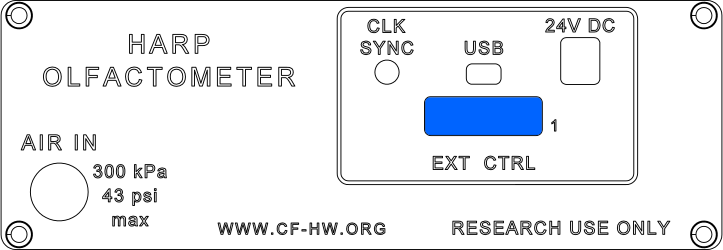

The available pins can be used to control the odor valves inside the olfactometer, as well as the end valve, flush valve and the check valves (≥v2.0).
A 3.3 V or 5 V digital signal can be used to control these valves. A logic HIGH value opens the valve, while a logic LOW value closes it.
| Pin | Function |
|---|---|
| 1 | Ground |
| 2 | - |
| 3 | End valve control |
| 4 | Odor valve 3 control |
| 5 | Odor valve 2 control |
| 6 | Odor valve 1 control |
| 7 | Odor valve 0 control |
| 8 | Ground |
Control
Step 1: External Configuration
- Set the
EnableValveExternalControlregister toEnabled.
Step 2: Sending TTL Signals
- A HIGH (3.3-5V) signal activates the valve.
- A LOW (0V) signal deactivates the valve.
Ensure that the Ground pin is also connected to the external controller.